 Smoko AI by Local Voice AI
Keep working.
We’ll take
the call.
Smoko is your AI phone assistant for the calls you can’t take. Built for Australian small business, with a greeting you make your own.
Now available on iOS and Android. Browser demo · no app download needed
A customer needs a hand.
The caller
Illustrative walkthrough. No call is placed.
TRY THE VOICE
Hear it for yourself.
Talk to the Smoko demo assistant right here in your browser, or ring it from your own phone.
AI demo. Calls may be recorded and transcribed. Normal carrier charges may apply.
Start with a simple hello.
Speak with the Smoko demo assistant, right here in your browser.
“Hi, can you tell me how this demo works?”
AI demo. Audio may be recorded and transcribed. Please use sample details. Privacy Policy
Press Start talking. Your browser may ask for your microphone.
Make Smoko your own.
Download the app to check your phone’s compatibility and start setting up your business.
Get Smoko on Google Play01 / MADE FOR YOUR BUSINESS
Your number.
Your kind of welcome.
A familiar first response, even when you’re in the middle of something.
Keep the number people know.
Check your carrier, then set up forwarding for unanswered calls.
Make the greeting your own.
Set the tone and introduction using the options available in your account.
Start with your business.
Add your details and follow the guided setup in the Android app.
INSIDE THE APP
Get to know Smoko AI.
Explore six views of the Android app, from calls to business settings. Choose a screenshot for a closer look.
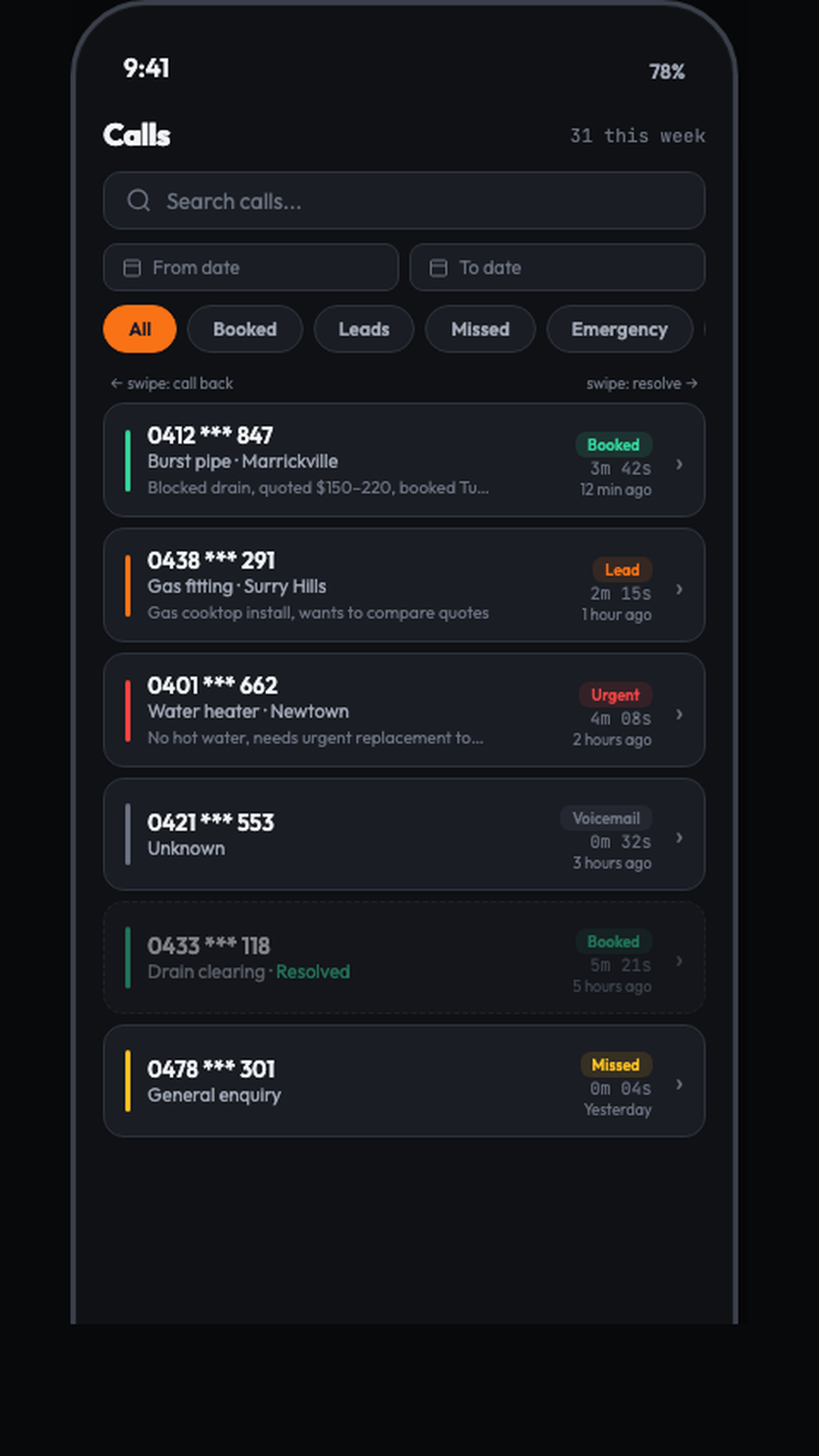
Every call, in one list.
Browse a call history, filter by outcome and open an individual call record.
In this screen
- Search and date filters
- Outcome badges
- Call durations
- Swipe actions
Calls and outcomes shown are examples. This screenshot does not confirm booking, emergency handling or message delivery.
04 / YOUR BUSINESS
A familiar voice.
A thoughtful first impression.
ILLUSTRATIVE GREETING“G’day. You’re speaking with an AI assistant, and this call is being recorded. How can I help?”
Example greeting · not a recorded call
A warm welcome.
An introduction that sounds like your business. This example includes an AI and recording notice; review your greeting and privacy requirements during setup.
05 / GETTING STARTED
Start with your phone.
Then make it your own.
Phone Check comes before signup. It helps you understand whether your carrier and plan support missed-call forwarding.
- 01
Check compatibility
Confirm your carrier and plan. See supported, limited or unsupported guidance before creating an account.
- 02
Add your business
Set up your business details, greeting and the options available for your service configuration.
- 03
Follow the forwarding guide
Keep your number and follow the instructions for your carrier. Phone Check itself does not change carrier settings or move your number.
When EVA is enabled for your account, the voice guide can help explain the current setup screen.
Read the full setup guide06 / SIMPLE PRICING
Room to grow.
No lock-in contract.
AUD, including GST. Monthly billing. No trial. Usage limits and overage terms apply; review the full plan details. Subscriptions are managed through the App Store or Google Play, depending on where you subscribe. Full plan details · Terms of service
Install Smoko from the App Store for iPhone or Google Play for Android. Phone Check helps you check carrier compatibility before signing up. Add your business details and follow the call-forwarding instructions in the app.
You use call forwarding on your existing number. Support depends on your carrier and plan; Phone Check helps you check compatibility first.
You can adjust the greeting and tone through the options available in your account. Smoko is an AI phone assistant; review your greeting and the privacy information during setup.
There is no trial. Plans are billed monthly with no lock-in contract. Subscriptions are billed and managed through the store where you subscribe: the App Store on iPhone or Google Play on Android.
Yes. Smoko is now available on iOS. Download it from the Apple App Store for iPhone. The Android app is also available on Google Play.
You can cancel your subscription in your Apple App Store or Google Play subscription settings, depending on where you subscribed. Cancelling billing and deleting your account are separate actions.
LOCAL VOICE AI